
EspoCRM vs SuiteCRM:
a lead and follow-up task tested
The same small sales workflow, with saved records and original screenshots from both official public demos.
Both kept the next action
with the lead.
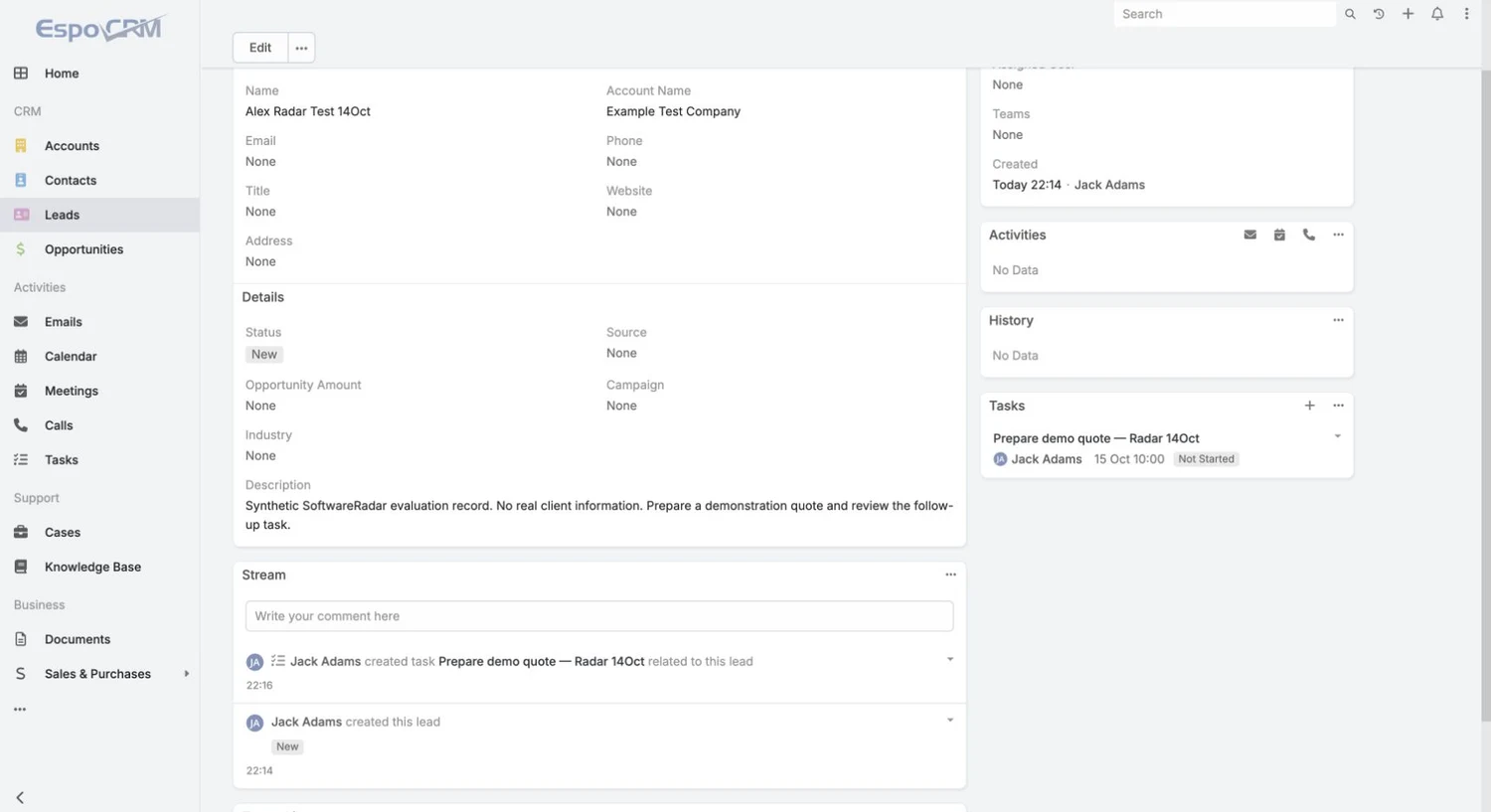
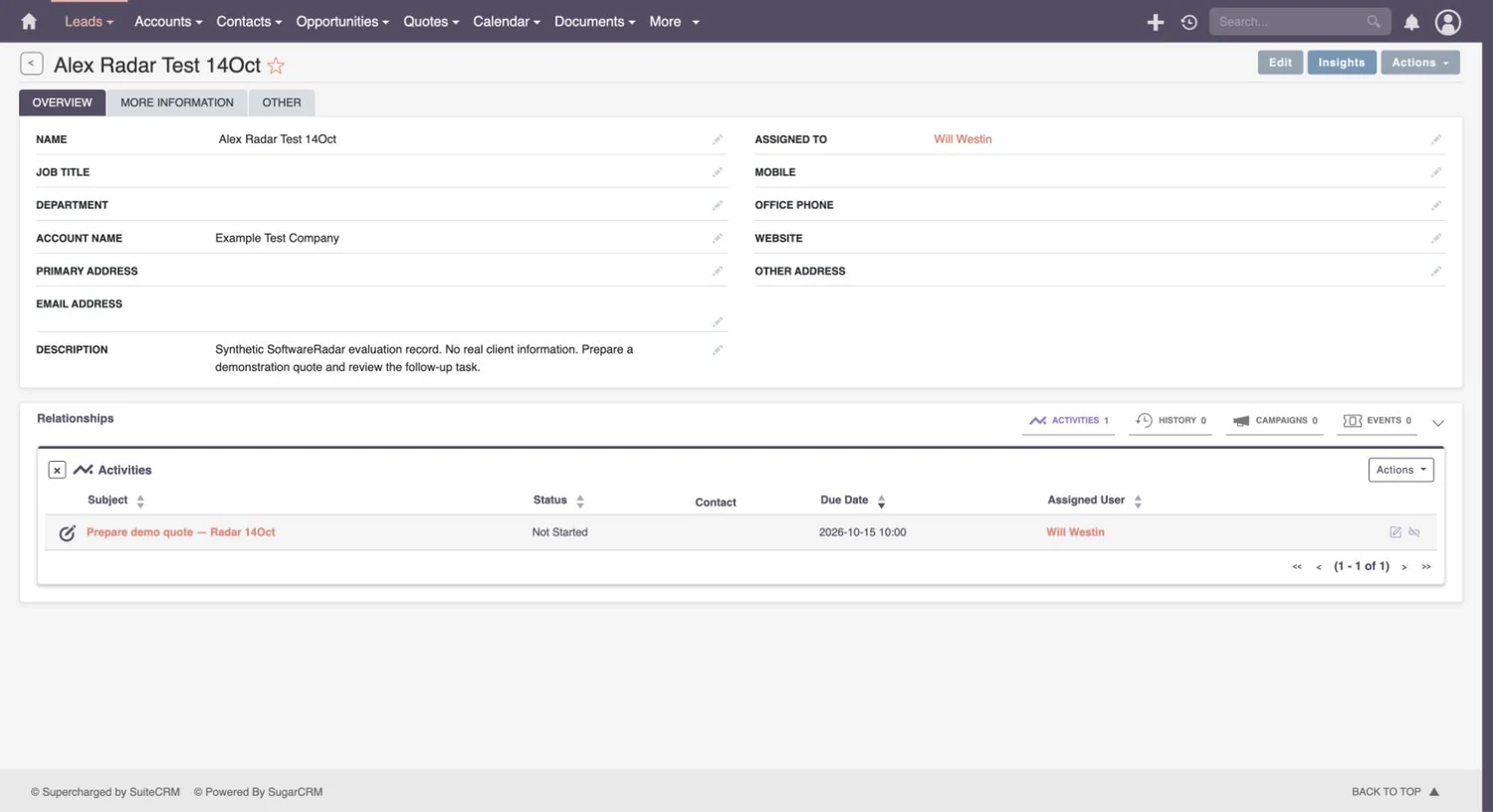
We saved a synthetic lead and a related task in each demo. EspoCRM displayed it in a Tasks panel and activity stream; SuiteCRM displayed it in the lead’s Activities relationship. We also inspected an EspoCRM lead CSV. These results support a basic follow-up workflow, rather than a universal winner.
The scenario we used
Create Alex Radar Test 14Oct at Example Test Company, leave email and phone blank, and save a description asking for a demonstration quote. Add Prepare demo quote — Radar 14Oct as a task related to that lead, due 15 October 2026 at 10:00 in the demo’s displayed time. Then inspect the saved relationship.
We used EspoCRM’s public demonstration and the official SuiteCRM 8 public demo. These are shared environments. The results below describe those sessions; the exact demo build numbers and extension manifests were not recorded.
What we actually verified
| Check | EspoCRM public demo | SuiteCRM 8 public demo |
|---|---|---|
| Lead saved | Name, company and description visible after save | Name, company and description visible after save |
| Task linked to lead | Tasks panel plus an activity-stream entry | Activities relationship containing one task |
| Due date and status | 15 Oct 10:00 · Not Started | 2026-10-15 10:00 · Not Started |
| Task’s assigned demo user | Jack Adams | Will Westin |
| Lead CSV inspected | One synthetic row; 53 columns | Not verified in this exercise |
EspoCRM: create the task from the lead
After saving the lead, we used the create control in its Tasks panel. The task form already pointed to the lead. We set the due date, saved it and returned to the lead. The Tasks panel showed the task title, demo owner, deadline and Not Started status; the stream separately recorded that the task had been created for this lead.
This gives a salesperson two ways to find the next action from the customer record. In your trial, check what happens when an overdue task is reassigned and whether another user can see it. A visible task is useful only if the right person owns it.
SuiteCRM: review the Activities relationship
We opened the lead’s Activities relationship, chose its Create Task action and completed the task form with the lead selected. The saved lead then showed one activity. Its row exposed the task title, Not Started status, due date and assigned demo user.
The relationship table makes those fields easy to review together. Test your team’s conventions before rollout: how tasks are named, who is assigned, and which activities belong in the record. Neither screenshot establishes that reminders, email delivery or escalation rules are configured.
An export check is more than a download button
In EspoCRM’s lead list, we filtered to the synthetic record, selected that row and chose Actions → Export. The export dialog offered a spreadsheet format; we selected CSV and all fields. We opened the downloaded file outside the CRM and confirmed one data row with 53 columns, including the lead’s name, company and description.
That verifies a lead export for this record. It does not show that the related task, attachments or history can be reconstructed elsewhere. A migration trial should export related record types, check the relationship identifiers and import them into the destination. SuiteCRM’s CSV result remains unverified here; it is not scored as a failed capability.
Free software and free hosting are different offers
EspoCRM’s self-hosted core is open source without a per-user licence fee. Its cloud service is paid, while advanced reports, workflows and BPM belong to Advanced Pack and quotation/invoicing tools belong to Sales Pack. Seeing those modules in a demonstration does not make them part of a free self-hosted installation. Check the core and extension list ↗
SuiteCRM’s software is free to download, with self-hosting costs separate. Its managed hosting starts at £50 a month and requires Standard support; setup and support are additional purchasing decisions. The hosting headline alone is therefore an incomplete quote. Check the current hosting and support options ↗
For both products, ask who owns updates, backups, permissions and recovery. Compare the total arrangement your business can operate, including the features your workflow needs.
How to use these results in your shortlist
Both demos completed the lead-and-task workflow. EspoCRM’s task panel and stream suit a record-centred follow-up check; SuiteCRM’s Activities table exposes the same deadline and ownership information in a relationship list. Try both with the same additional requirement before choosing: an overdue task, reassignment to a colleague, or a complete export into your replacement system.
This exercise did not measure speed, ease of learning, production reliability or security. No timed benchmark was used. A shared demo cannot prove those qualities for your intended deployment.
Results and downloads
Download the dated test-results dataset → · Suggest a correction
Cite the exercise
Link to the dated comparison when using these observed results. Citation is voluntary.